
iFANN
    iFANNを検索...
    ログイン
    ホーム
    ニュース
    動画
    写真
    GIF
    見つける
    投票
    アワード
    iFAMOUS
    ウィキ
    アニメ
    ルーム
    通知
    メッセージ
    ブックマーク
    プロフィール
    ウィキアワードiFAMOUSランキング業界クリエイター報酬ユーザー報酬利用規約プライバシーコミュニティガイドライン削除申請 / DMCAヘルプ開発者

    © 2026 iFANN

    ホーム
    検索
    メッセージ
    お知らせ
    プロフィール
    写真
    Timofey
    Timofey@timofey1mo
    🏢Lenovo💭Productivity💭Tech
    Excel keyboard shortcuts guide

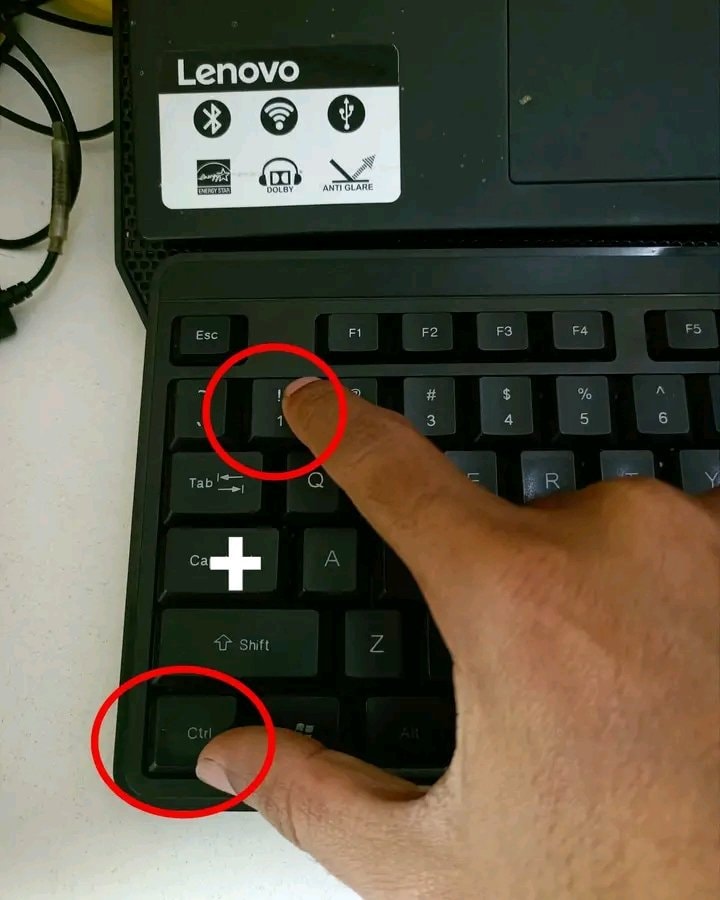
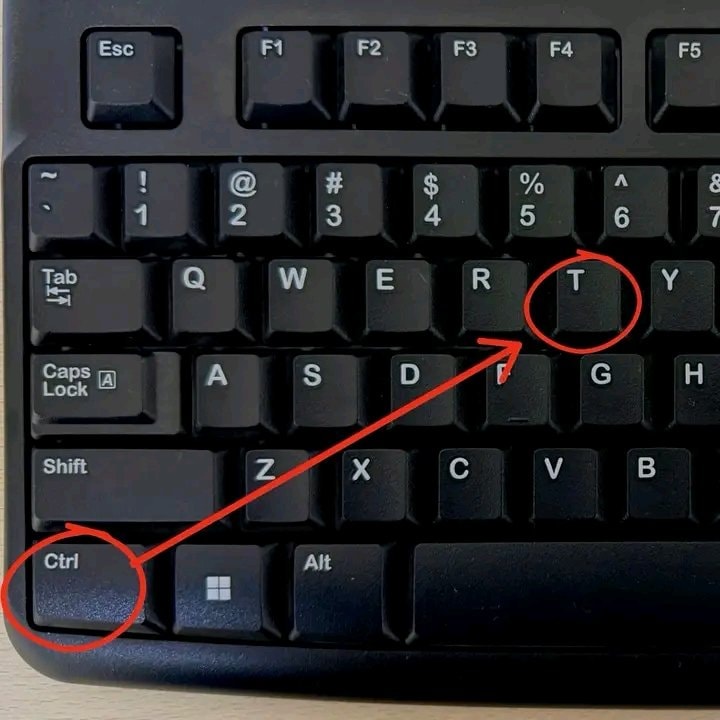
    @timofeyIf you live inside Excel, these shortcuts are worth keeping close. Ctrl + 1 opens the Format Cells dialog, which is your one-stop spot for number formats, alignment, fonts, borders, fills, and cell protection. Toggling bold, italic, underline, or strikethrough is just Ctrl + 2, 3, 4, or 5. For number displays, hold Ctrl + Shift and tap $ for currency, % for percentage, # for date, @ for time, ^ for scientific,! for number, and ~ for general. Turn a range into an Excel Table with Ctrl + T, let Flash Fill work its magic with Ctrl + E, and pull up the Quick Analysis tool with Ctrl + Q. Filters flip on or off with Ctrl + Shift + L, and filling down or right is Ctrl + D or Ctrl + R. Copy and cut are Ctrl + C and Ctrl + X. Then a few extra: Ctrl + Z to undo, Ctrl + Y to redo, Ctrl + F to find, Ctrl + H to replace, Ctrl + G for Go To, Ctrl + K for hyperlink, F2 to edit the active cell, and F7 for spelling check. The visual shows a hand pressing '!' with Ctrl, which is the number format shortcut

    元の投稿を見る
    Excel keyboard shortcuts guide

    @timofeyさんの写真· Aug 21, 2026· Lenovo

    この写真について

    A hand is pressing the '!' key and the 'Ctrl' key on a Lenovo laptop keyboard. The image has a tech tutorial aesthetic. Red circles highlight the keys being pressed.

    Lenovoの写真をすべて見るLenovoのウィキを読む

    ?

    まだコメントはありません。最初のコメントを投稿しましょう!

    Lenovoの写真をもっと見る

    Lenovoの写真をすべて見る
    philosophical reflection textphilosophical reflection text20 Microsoft Excel Keyboard Shortcuts20 Microsoft Excel Keyboard ShortcutsCodex activity view inbox mode2Codex activity view inbox modeDataChaz note-taking app frustrationDataChaz note-taking app frustration
    写真
    Timofey
    Timofey@timofey1mo
    🏢Lenovo💭Productivity💭Tech
    Excel keyboard shortcuts guide

    @timofeyIf you live inside Excel, these shortcuts are worth keeping close. Ctrl + 1 opens the Format Cells dialog, which is your one-stop spot for number formats, alignment, fonts, borders, fills, and cell protection. Toggling bold, italic, underline, or strikethrough is just Ctrl + 2, 3, 4, or 5. For number displays, hold Ctrl + Shift and tap $ for currency, % for percentage, # for date, @ for time, ^ for scientific,! for number, and ~ for general. Turn a range into an Excel Table with Ctrl + T, let Flash Fill work its magic with Ctrl + E, and pull up the Quick Analysis tool with Ctrl + Q. Filters flip on or off with Ctrl + Shift + L, and filling down or right is Ctrl + D or Ctrl + R. Copy and cut are Ctrl + C and Ctrl + X. Then a few extra: Ctrl + Z to undo, Ctrl + Y to redo, Ctrl + F to find, Ctrl + H to replace, Ctrl + G for Go To, Ctrl + K for hyperlink, F2 to edit the active cell, and F7 for spelling check. The visual shows a hand pressing '!' with Ctrl, which is the number format shortcut

    元の投稿を見る

    Excel keyboard shortcuts guide

    @timofeyさんの写真· Aug 21, 2026· Lenovo

    この写真について

    A hand is pressing the '!' key and the 'Ctrl' key on a Lenovo laptop keyboard. The image has a tech tutorial aesthetic. Red circles highlight the keys being pressed.

    Lenovoの写真をすべて見るLenovoのウィキを読む

    ?

    まだコメントはありません。最初のコメントを投稿しましょう!

    Lenovoの写真をもっと見る

    Lenovoの写真をすべて見る
    philosophical reflection textphilosophical reflection text20 Microsoft Excel Keyboard Shortcuts20 Microsoft Excel Keyboard ShortcutsCodex activity view inbox mode2Codex activity view inbox modeDataChaz note-taking app frustrationDataChaz note-taking app frustration